GitOps at Scale: Kubernetes & ArgoCD for Microservices
Answer-first: GitOps at scale uses ArgoCD, Helm chart templates, and automated CI/CD pipelines to manage multi-cluster Kubernetes deployments with full audit traceability and rapid rollback capabilities.
Building 21 well-architected Go microservices is only half the battle. If your deployment process relies on an engineer running kubectl apply from their laptop on a Friday afternoon, you haven’t built an enterprise platform — you’ve built a ticking time bomb.
When designing this composable e-commerce ecosystem, we made one hard architectural rule from day one: no human touches the production cluster directly. Everything flows through Git. ArgoCD enforces it. Choosing EKS over ECS was a key architectural decision that enabled this first-class GitOps model; for a full cost and scaling breakdown, see our AWS EKS vs ECS Comparison.
The GitOps Mental Model: Git is the Source of Truth
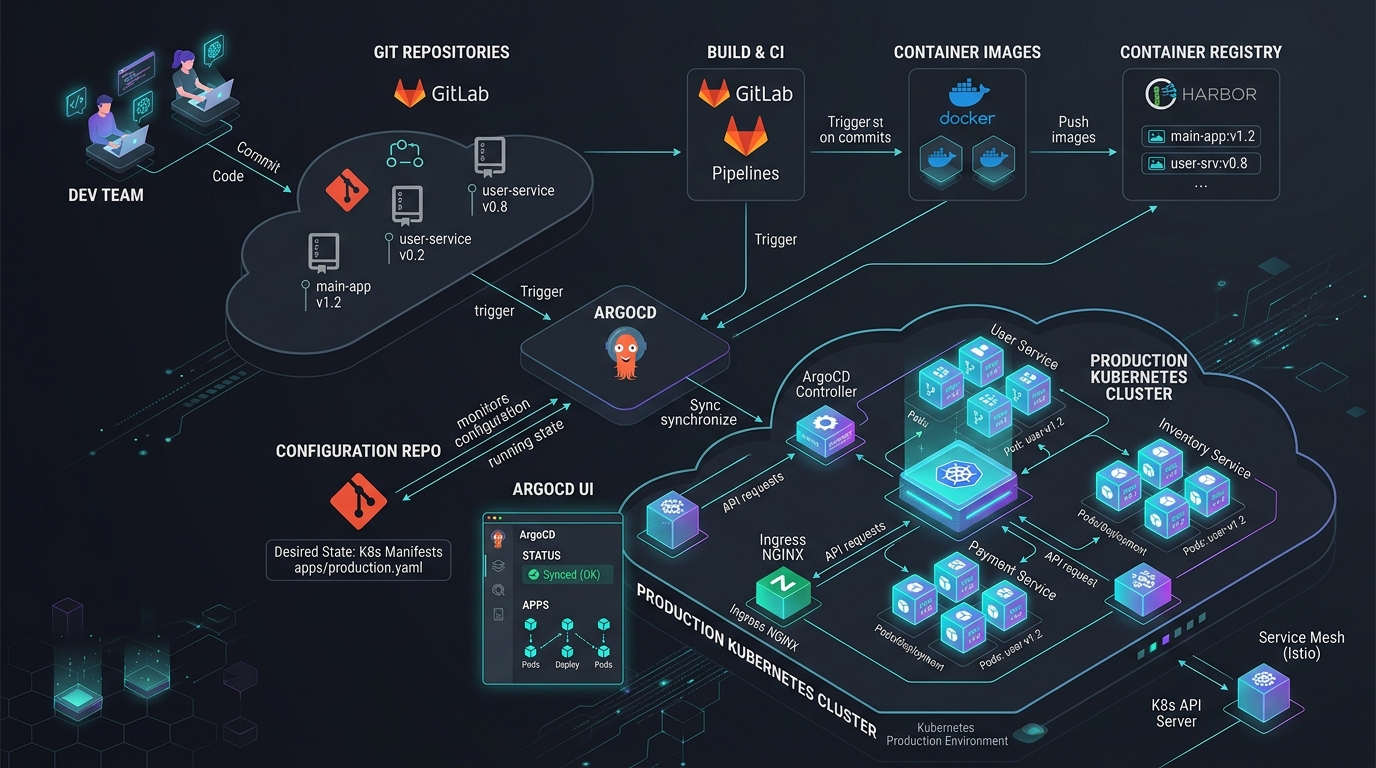
The core principle: a Git repository is the declarative desired state of your entire infrastructure. ArgoCD is the enforcement agent that continuously reconciles cluster state to match that Git state.
This is fundamentally different from a traditional CI/CD push model:
graph LR
    subgraph "CI Pipeline — Code"
        DEV["Developer"] -- "git push" --> APP["App Repository"]
        APP -- "GitHub Actions" --> DOCKER[("Container Registry")]
    end

    subgraph "CD Pipeline — GitOps"
        DOCKER -- "Updates image tag in" --> MAN["Manifest Repository"]
        ARGO["ArgoCD Controller"] -- "Polls every 3 min" --> MAN
    end

    subgraph "Kubernetes Cluster"
        ARGO -- "Applies diff, rolling restart" --> K8S["K8s Nodes"]
    end
- CI: Engineer pushes Go code → GitHub Actions tests, builds the binary, pushes a Docker image to the registry, then opens a PR on a separate Manifest Repository updating the image tag.
- CD: ArgoCD watches the Manifest Repo. When the PR is merged, ArgoCD detects the drift between desired state (Git) and actual state (cluster), and self-corrects automatically.
No human touches kubectl. No one needs cluster credentials in CI. The cluster is pull-based, not push-based.
Repository Structure
Split your codebase into two repos: one for application code (Go services), one for Kubernetes manifests. The manifest repo contains apps/<service>/base/ (shared YAML) and apps/<service>/overlays/{dev,staging,prod}/ (environment patches). Every deploy is a Git commit with timestamp, author, and image tag — rolling back is a git revert, not a frantic kubectl rollout undo.
We use two separate repositories — a pattern known as split-repo GitOps:
manifest-repo/
├── apps/
│   ├── order-service/
│   │   ├── base/
│   │   │   ├── deployment.yaml
│   │   │   ├── service.yaml
│   │   │   └── kustomization.yaml
│   │   └── overlays/
│   │       ├── dev/
│   │       │   └── kustomization.yaml
│   │       ├── staging/
│   │       │   └── kustomization.yaml
│   │       └── prod/
│   │           ├── kustomization.yaml
│   │           └── hpa.yaml
│   └── checkout-service/
│       └── ...
└── argocd/
    ├── root-app.yaml          ← App-of-Apps root
    ├── order-service-prod.yaml
    └── checkout-service-prod.yaml
Keeping manifests in a separate repo from application code provides a clean audit trail: every deploy is a Git commit with a timestamp, author, and image tag. Rolling back is a git revert.
The ArgoCD Application CRD
Each service gets an ArgoCD Application CRD pointing to its manifest path. The two critical production settings: selfHeal: true (ArgoCD reverts any manual kubectl change within 3 minutes, enforcing Git as the only source of truth) and prune: true (resources deleted from Git are deleted from the cluster automatically on next sync).
Every service gets an Application CRD that tells ArgoCD exactly which path in the manifest repo to watch, and where to deploy it:
# argocd/order-service-prod.yaml
apiVersion: argoproj.io/v1alpha1
kind: Application
metadata:
  name: order-service-production
  namespace: argocd
  labels:
    environment: production
    team: commerce
spec:
  project: ecommerce-prod

  source:
    repoURL: https://github.com/your-org/manifest-repo.git
    targetRevision: main
    path: apps/order-service/overlays/prod  # points at prod Kustomize overlay

  destination:
    server: https://kubernetes.default.svc
    namespace: production

  syncPolicy:
    automated:
      prune: true      # remove resources deleted from Git
      selfHeal: true   # revert manual kubectl changes automatically
    syncOptions:
      - CreateNamespace=true
      - ServerSideApply=true  # avoids annotation length limits on large CRDs
    retry:
      limit: 3
      backoff:
        duration: 30s
        factor: 2
        maxDuration: 5m

  # Health check: ArgoCD won't mark as Healthy until all pods are Running
  ignoreDifferences:
    - group: apps
      kind: Deployment
      jsonPointers:
        - `.spec.replicas`  # ignore HPA-managed replica count drift
selfHeal: trueis the critical production setting. If an SRE manually patches a Deployment in production (for whatever reason), ArgoCD will revert it within 3 minutes. Git is the only source of truth — no exceptions.
Taming YAML Chaos with Kustomize
Kustomize base + overlay model: define environment-agnostic YAML once in base/ (deployment, service, probes), then patch only the deltas in overlays/{dev,staging,prod}/ — image tag, replica count, resource limits, secrets. The overlay never duplicates the base; it only declares what changes. 21 services × 3 environments = 63 overlays with zero configuration drift.
Managing manifests for 21 services across 3 environments produces 60+ YAML files. Kustomize solves this with a base + overlay model.
Base Manifest (Environment-Agnostic)
Standard Kubernetes pod spec, resource limits, and health probes shared across all environments:
# apps/order-service/base/deployment.yaml
apiVersion: apps/v1
kind: Deployment
metadata:
  name: order-service
spec:
  replicas: 1  # overridden per environment
  selector:
    matchLabels:
      app: order-service
  template:
    metadata:
      labels:
        app: order-service
    spec:
      containers:
        - name: order-service
          image: registry.example.com/order-service:latest  # tag overridden per environment
          ports:
            - containerPort: 8080
          resources:
            requests:
              cpu: "100m"
              memory: "128Mi"
            limits:
              cpu: "500m"
              memory: "512Mi"
          readinessProbe:
            httpGet:
              path: /health/ready
              port: 8080
            initialDelaySeconds: 10
            periodSeconds: 5
          livenessProbe:
            httpGet:
              path: /health/live
              port: 8080
            initialDelaySeconds: 30
            periodSeconds: 15
The base kustomization file aggregates these core resources:
# apps/order-service/base/kustomization.yaml
apiVersion: kustomize.config.k8s.io/v1beta1
kind: Kustomization
resources:
  - deployment.yaml
  - service.yaml
Production Overlay (Patches Only What Differs)
The overlay patches environment-specific values without duplicating YAML:
# apps/order-service/overlays/prod/kustomization.yaml
apiVersion: kustomize.config.k8s.io/v1beta1
kind: Kustomization

resources:
  - ../../base
  - hpa.yaml          # HPA only in prod

# Override the image tag for this specific release
images:
  - name: registry.example.com/order-service
    newTag: "v1.47.2"  # updated by CI pipeline after each build

# Strategic merge patch — only the fields that differ from base
patchesStrategicMerge:
  - |-
    apiVersion: apps/v1
    kind: Deployment
    metadata:
      name: order-service
    spec:
      replicas: 4      # prod gets 4 replicas vs dev's 1
      template:
        spec:
          containers:
            - name: order-service
              resources:
                requests:
                  cpu: "500m"
                  memory: "512Mi"
                limits:
                  cpu: "2000m"
                  memory: "2Gi"
              env:
                - name: DB_HOST
                  valueFrom:
                    secretKeyRef:
                      name: order-service-prod-secrets
                      key: db_host
Production workloads attach a HorizontalPodAutoscaler to handle fluctuating user load:
# apps/order-service/overlays/prod/hpa.yaml
apiVersion: autoscaling/v2
kind: HorizontalPodAutoscaler
metadata:
  name: order-service-hpa
spec:
  scaleTargetRef:
    apiVersion: apps/v1
    kind: Deployment
    name: order-service
  minReplicas: 4
  maxReplicas: 20
  metrics:
    - type: Resource
      resource:
        name: cpu
        target:
          type: Utilization
          averageUtilization: 70
The dev overlay uses newTag: "latest", replicas: 1, lower resource limits, and no HPA. The staging overlay mirrors prod sizing but points to a staging database secret. All three share the identical base deployment logic.
The App-of-Apps Root
The App-of-Apps pattern: one root ArgoCD Application watches the argocd/ directory and manages all other Application objects. Adding a new microservice requires only one step — merge a new Application YAML into argocd/ — and ArgoCD provisions it automatically with zero manual intervention or cluster access.
For 21 services, creating ArgoCD Application objects one-by-one is impractical. We use the App-of-Apps pattern: a single root Application that manages all other Application objects:
# argocd/root-app.yaml
apiVersion: argoproj.io/v1alpha1
kind: Application
metadata:
  name: ecommerce-platform
  namespace: argocd
spec:
  project: default
  source:
    repoURL: https://github.com/your-org/manifest-repo.git
    targetRevision: main
    path: argocd/  # ArgoCD watches this directory for Application CRDs
  destination:
    server: https://kubernetes.default.svc
    namespace: argocd
  syncPolicy:
    automated:
      prune: true
      selfHeal: true
When a new microservice is added to the platform, the process is:
- Add a new
ApplicationYAML toargocd/ - Merge the PR
- The root App-of-Apps detects the new file and creates the child Application automatically
- ArgoCD provisions the new service with zero manual intervention
The Rollback Story: git revert is Enough
With ArgoCD, production rollback is 4 steps: git log to find the bad commit, git revert <hash>, git push, then wait 3 minutes for ArgoCD to auto-sync. No kubectl required, no cluster credentials, no frantic image tag hunting. For high-traffic services like Checkout and Payment, Argo Rollouts adds Prometheus-based canary health gates that abort and auto-rollback if p99 latency or error rate exceeds thresholds.
Before GitOps, rolling back a broken deployment meant frantically digging through CI logs. With ArgoCD, disaster recovery is a four-step process:
# 1. Identify the bad commit
git log --oneline manifests/apps/checkout-service/overlays/prod/kustomization.yaml

# 2. Revert it
git revert <bad-commit-hash> --no-edit

# 3. Push
git push origin main

# 4. ArgoCD detects the revert within 3 minutes and rolls back automatically
# No kubectl required. No cluster access required.
The revert creates a new commit with full auditability: who reverted, when, and which change was undone. The cluster state is back to the last stable image in under 5 minutes.
For critical services (Checkout, Payment), we additionally use Argo Rollouts with Prometheus-based health gates — if error rate or p99 latency exceeds thresholds during a rollout, the canary is automatically aborted and traffic is shifted back to the stable version without human intervention.
Summary: The Principles That Make This Work
Five principles that make GitOps production-grade: (1) selfHeal: true — Git wins over every manual change; (2) Kustomize overlays — no YAML duplication across environments; (3) rollback = git revert — auditable, cluster-credential-free; (4) App-of-Apps — new services self-register from a single directory; (5) no human needs kubectl access or cluster credentials in CI.
| Principle | Implementation |
|---|---|
| Git is the only source of truth | selfHeal: true on all prod Applications |
| No drift between environments | Kustomize base + overlays — patches, never copies |
| Rollback is a Git operation | git revert → ArgoCD auto-syncs |
| New services self-register | App-of-Apps root watches the argocd/ directory |
| Human error is structurally prevented | No one needs kubectl or cluster credentials in CI |
The investment pays off the first time you hit a bad production deploy at 2am. Instead of a frantic kubectl session, you open a terminal, type three git commands, and watch ArgoCD fix the cluster by itself.
Continue Reading:
- AWS EKS vs ECS: Real-World Use Cases (2026) — a practitioner’s comparison on choosing the right container orchestrator on AWS, based on running this stack in production.
- Go Microservices Architecture: Production Guide — the production architecture manual for the Go services deployed in this cluster.
- What’s New in Argo CD 3.4 & 3.3: Cluster Pause & Upgrades — the latest features and breaking changes before you upgrade your GitOps platform.
- Mastering Event-Driven Architecture with Dapr Pub/Sub — how the 21 microservices deployed here communicate asynchronously.
- MySQL Scaling: Replication, Sharding & TiDB — scaling the databases that these Kubernetes-managed services depend on.
Frequently Asked Questions
Why is ‘kubectl apply’ considered an anti-pattern in a production GitOps environment?
Directly running kubectl apply bypasses the version control system, creating drift between the desired state in Git and the actual state of the cluster. It introduces security risks by requiring developer access keys and makes it impossible to audit changes, perform automated rollbacks, or recover from disasters via Git history.
How does the Argo CD App-of-Apps pattern simplify configuration management for 21+ microservices?
The App-of-Apps pattern uses a root Argo CD Application that manages a collection of child Application manifests. Each child application represents a microservice deployment. This hierarchy allows platform teams to bootstrap, version control, and synchronize the entire multi-tenant service ecosystem as a single declarative unit.
How does Argo CD handle emergency production rollbacks when a deployed image is faulty?
Emergency rollbacks in GitOps are executed by running git revert on the offending Git commit. Argo CD detects the updated target commit in the repository within minutes and automatically synchronizes the Kubernetes cluster to the previous stable manifest state, preserving full auditability without requiring direct cluster access.
From the Tech Radar: The May 13, 2026 Tech Radar covered a directly relevant signal — Signadot’s AgentOps meets Kubernetes initiative, which bridges AI agent testing with Kubernetes sandbox environments. Relevant for any team running GitOps pipelines with agentic CI/CD workflows.